New releaseBaoCut 3.3.0Release notes

Tell it what you want. Keep editing what it makes.

BaoCut is an AI video agent built around an editable video, not a one-shot MP4. It transcribes, subtitles, translates, dubs, cuts and animates, and every result lands in a timeline you can keep editing.

macOS 14+ on Apple Silicon · Windows x64 (CPU, CUDA, Vulkan)

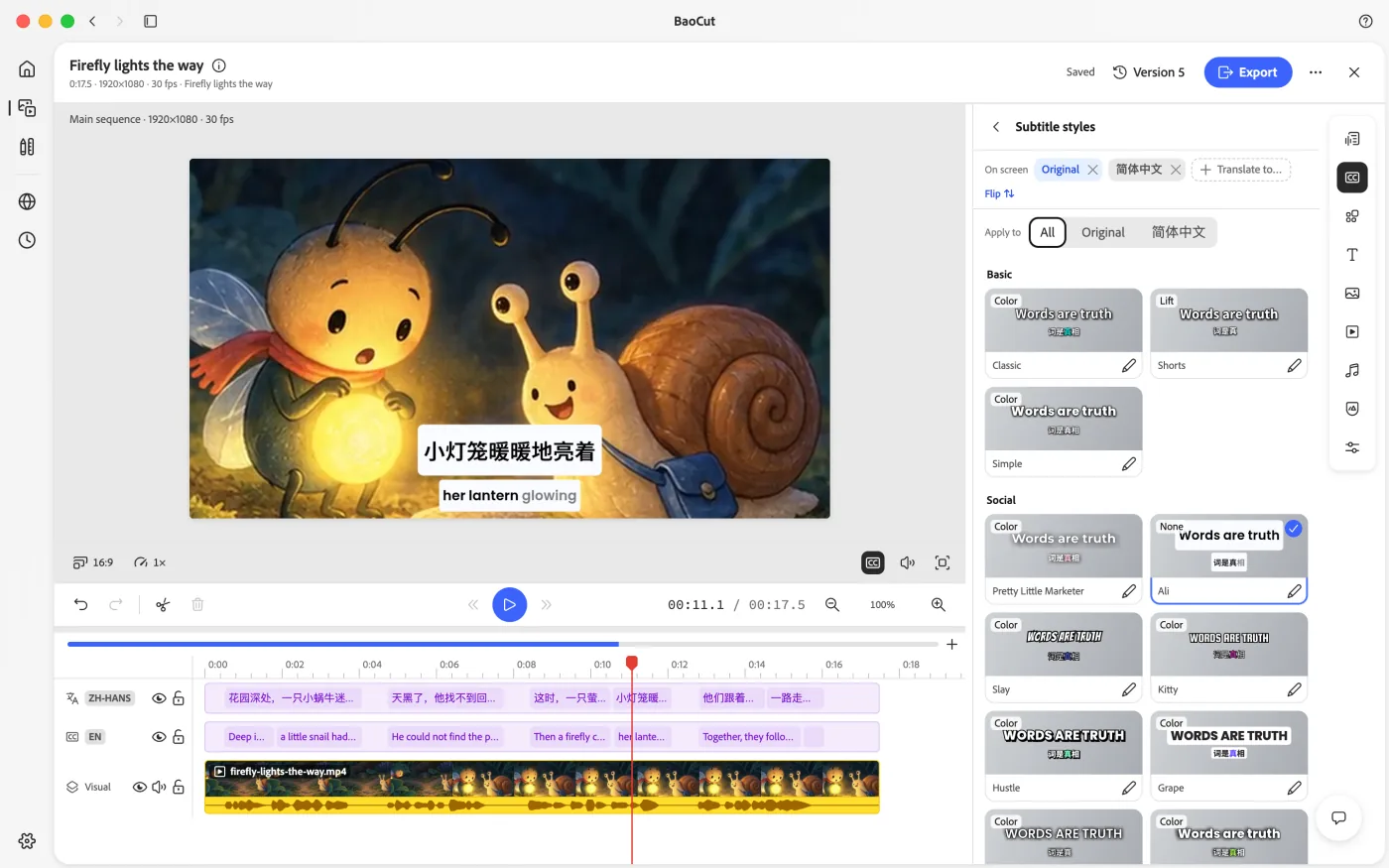
The BaoCut video editor: preview with a caption, the subtitles panel with original and translated lines, and the timeline

Bring your own agent engine

  • Claude Code
  • Codex CLI
  • GitHub Copilot CLI
  • Gemini CLI
  • Cursor Agent
  • OpenCode
  • Pi
  • Kimi Code
  • Grok

Claude Code and Codex CLI are validated end to end. Any Agent Client Protocol agent plugs in through the same driver.

Why BaoCut

Most AI video tools render once and hand you a file. BaoCut hands you the video.

If the second sentence of the translation is wrong, you shouldn’t have to start over. BaoCut keeps every change inside one editable video.

  • The video is the source of truth

    Transcripts, translations, subtitle layers, chapters, voice-overs and motion graphics live inside one editable video. SRT, MP4, audio and transcripts are exports of it.

  • Change only what you asked for

    Fix one subtitle line, swap one shot, redo one voice-over sentence. The agent edits that scope and reports a receipt of what changed.

  • One editor for you and the agent

    You drag a clip, the agent rewrites a caption. Both go through the same commands, transactions and undo stack, so you can take over at any point.

  • Bounded autonomy

    The agent works inside an explicit scope, access mode and budget. Destructive actions ask first. Downloaded pages and transcripts are data, never instructions.

  • Honest delivery

    It reports what it measured, what it actually looked at, and what still needs a human ear. A failed check is reported as a failed check.

Scene · Translate and subtitle

One sentence in, bilingual subtitles out. Every line stays editable.

Drop in a video and ask for a translation. The agent transcribes, translates and lays the subtitles out on the timeline; you review, fix a line, and export.

The BaoCut editor with English subtitles and a Simplified Chinese translation on two tracks, and the subtitles panel listing both side by side
  1. 01

    Transcribe

    Word-level timing from a local model or an online API. Segments stream onto the timeline while the job runs.

  2. 02

    Translate sentence by sentence

    Each translated sentence stays paired with its original, so you can read them side by side.

  3. 03

    Bilingual subtitles

    Original and translation sit on their own tracks under one style. Flip their order or add another language.

  4. 04

    Fix any line

    Click a translation to edit it yourself, or ask the agent to redo one sentence. It changes only that line.

  5. 05

    Export

    MP4 with burned-in subtitles, or SRT and WebVTT files alongside it.

What it can do

From raw footage or a one-line brief to a finished, still-editable video

Ask in plain language. The agent plans the work, runs the tools and puts every result on the timeline.

01From existing footage

  • Transcribe

    Local models (Whisper large-v3 / v3-turbo, Qwen3-ASR, MOSS with speaker diarization) or online APIs, with word-level timing. Segments stream into the timeline while the job runs.

  • Subtitle and translate

    Original, translated or bilingual subtitles. The agent translates sentence by sentence, and each video keeps its own subtitle style.

  • Dub into another language

    Translate, separate vocals from the background with HTDemucs, synthesize each sentence with a cloned or preset voice, and lay the new track on the timeline.

  • Cut a talking-head recording

    Remove filler words, long pauses, retakes and false starts on the timeline. The original media is never touched.

  • Chapters, summaries and more

    Chapters, summaries, titles, blog posts and shorts written from the timed transcript, with every claim traceable to a timestamp.

02From a brief

  • Make a video from a prompt

    24 built-in templates for explainers, product launches, trailers, tutorials, data stories, kinetic typography and more.

  • Narration first

    Plan the script, synthesize the voice in one pass, then cut the picture to the narration.

  • Motion graphics as code

    The agent writes self-contained HTML compositions — lower thirds, big numbers, callouts, brand stingers — bakes the frames and places them on the timeline.

  • Image generation

    For shots that need a still: local Qwen-Image or an online provider.

03Delivery

  • Export anything

    MP4 with burned-in or sidecar subtitles, SRT and WebVTT, transcripts and audio stems.

  • Take the project with you

    A portable .baocut bundle reopens on another machine with the video, its documents and media versions, ready to keep editing.

Space

Everything your projects produced, in one place

Space is a live view over the videos, assets and outputs in all your projects. Search, filter by project or status, and reopen anything in the editor to keep working on it.

  • Videos, exports, subtitles and documents side by side
  • Files stay in their own project folders
  • Open any video straight into the editor
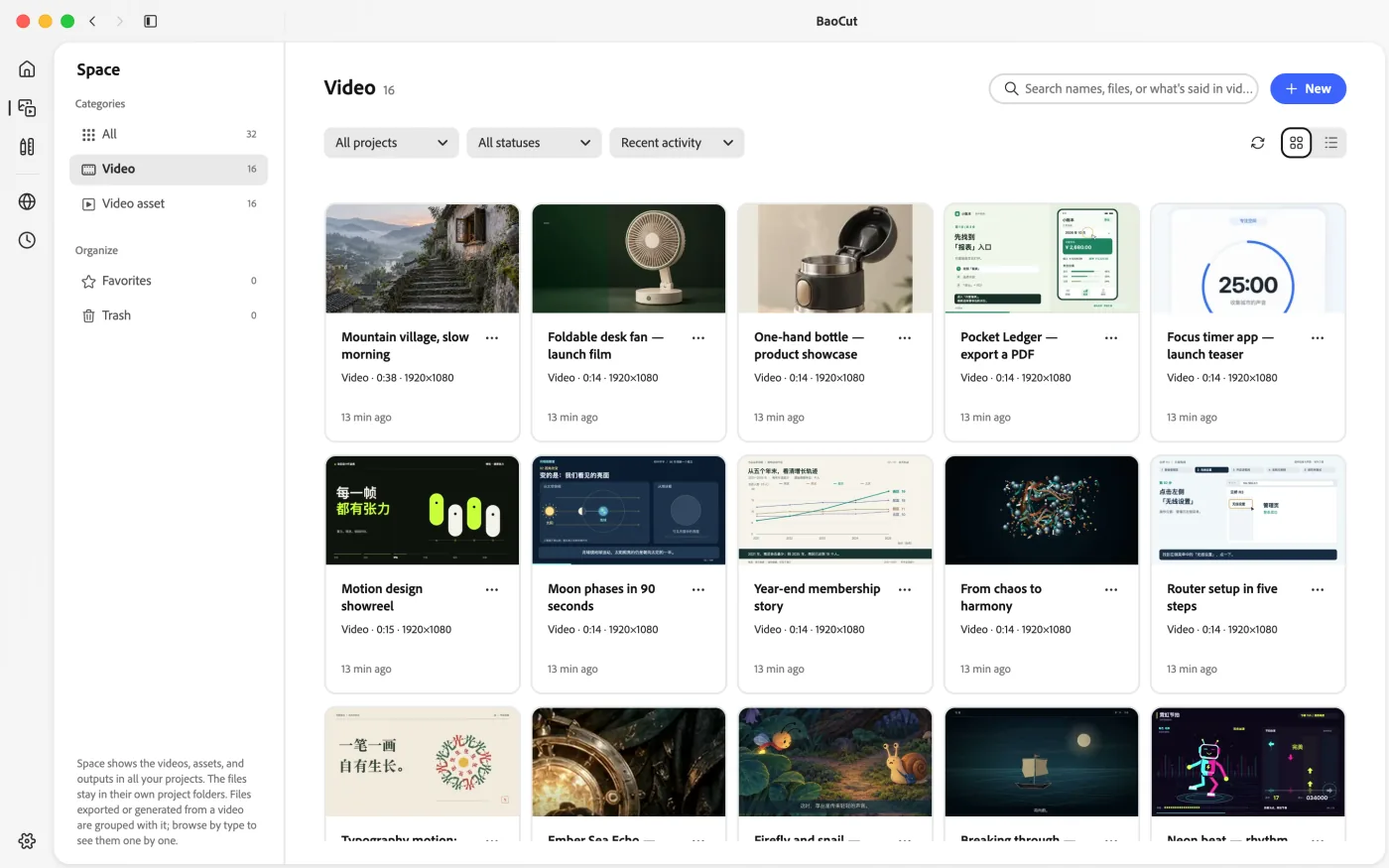
BaoCut Space showing a grid of videos from several projects

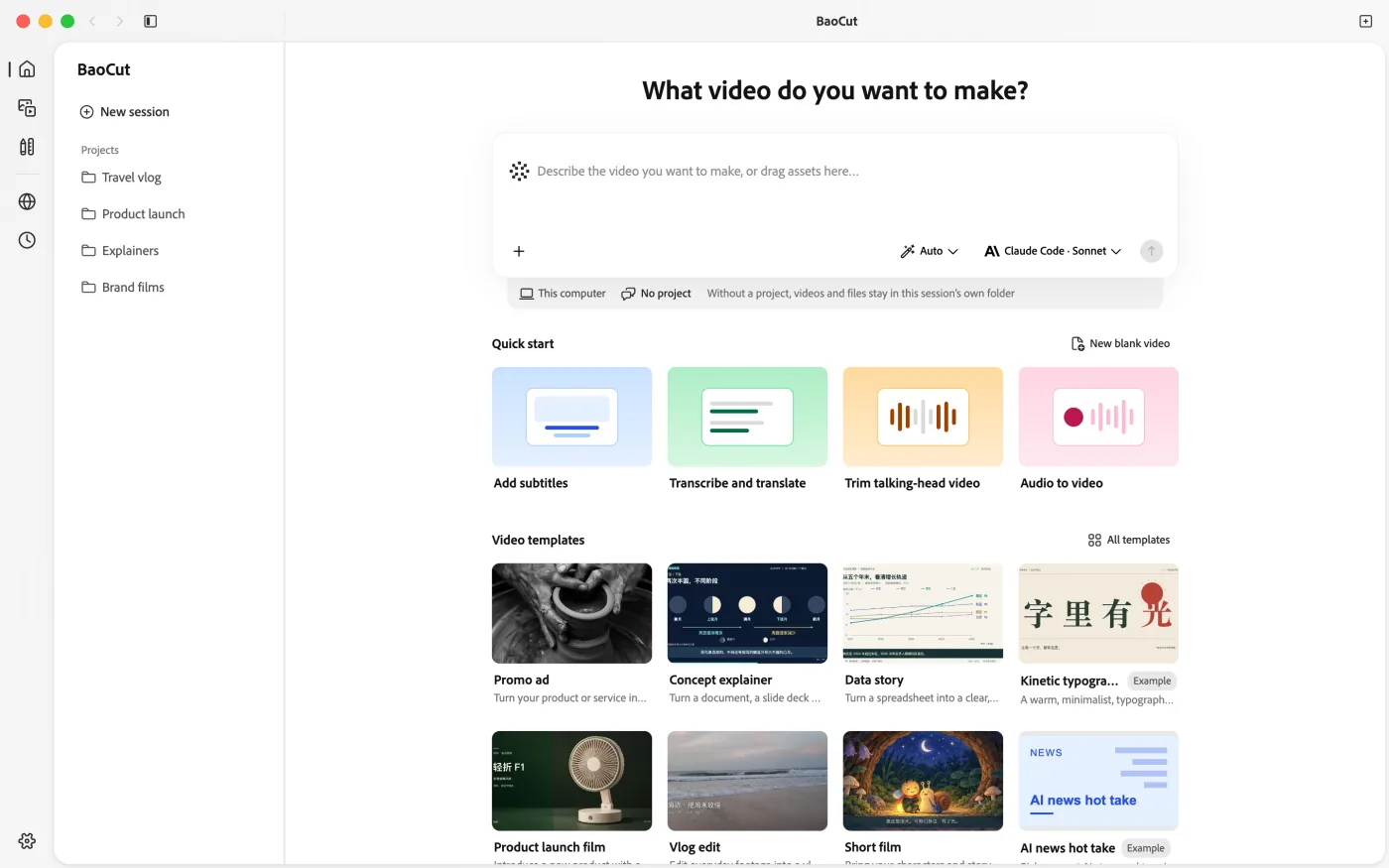
Home

Start from a sentence, a file or a template

Home is where you work with the agent. Describe the video you want, drop in footage, or pick a template; each session can belong to a project, and its results open in the same editor.

  • Sessions grouped by project
  • Templates with example briefs to start from
  • Pick the agent engine and access mode per session
The BaoCut Home page where you start a conversation with the agent

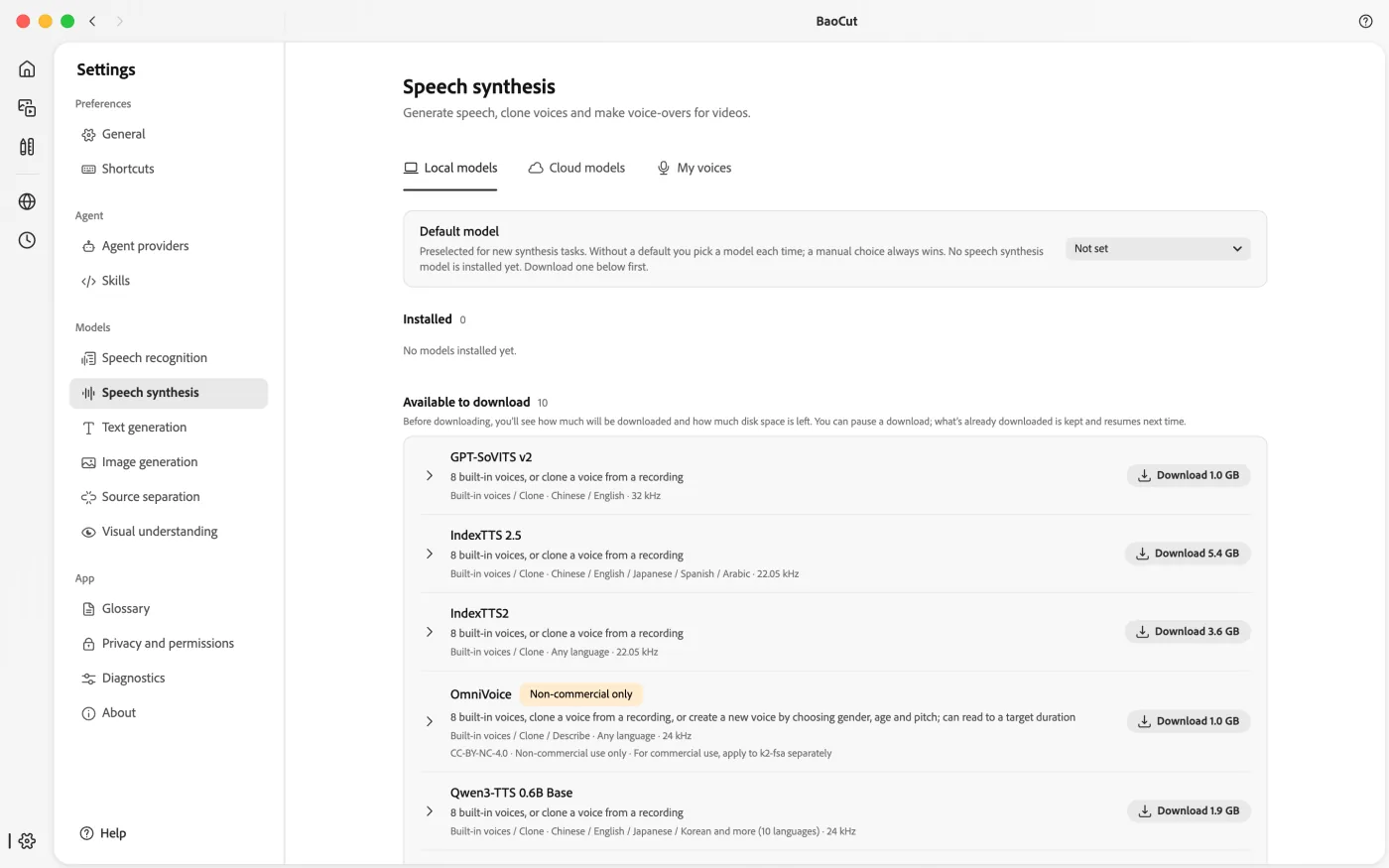
Models

Bring your own models, local or online

Capabilities — transcribe, speak, generate images, generate text, separate audio — are decoupled from providers. Run models on your own machine, point a capability at an API, or share one machine’s local models with others on your LAN. A usage ledger tracks cost per job.

Runs locally

  • MLX and Core ML on Apple Silicon
  • whisper.cpp and candle on Windows, with CUDA and Vulkan builds
  • Whisper, Qwen3-ASR, MOSS, HTDemucs, Qwen-Image

Or connect

  • OpenAI
  • Anthropic
  • Google
  • ElevenLabs
  • DeepSeek
  • Moonshot
  • Qwen
  • Zhipu
  • MiniMax
  • Volcengine
  • xAI
  • Mistral
  • Groq
  • OpenRouter
  • SiliconFlow
  • any OpenAI-compatible endpoint
BaoCut model settings with local models and online providers

Made with BaoCut

Start from a template. These were made by the agent.

Each preview was produced by BaoCut’s agent from the template’s own brief and exported from BaoCut. Pick one in Home, fill in the brief, and make it yours.

  • Product launch film

    Introduce a new product with a reveal and a clear next step.

    Scene template · 16:9 · 45s

  • Epic mood trailer

    A fast-cut p5.js trailer with the mood of a long voyage and homecoming.

    Showcase example

  • Motion design showreel

    A tight motion graphics short that shows off motion design skills.

    Showcase example · 15s

  • Kinetic typography short

    A warm, minimalist, typography-driven short made with JavaScript.

    Showcase example · 16:9 · 30s

  • Data story

    Turn a spreadsheet into a clear, intuitive story.

    Scene template · 16:9 · 90s

  • Cinematic scene

    Bring an imagined place to life with cinematic motion.

    Scene template · 16:9 · 15s

  • Concept explainer

    Turn a document, a slide deck or a topic into an easy-to-follow video.

    Scene template · 16:9 · 90s

  • Rhythm dance animation

    A high-energy arcade dance video: animated character plus rhythm game effects.

    Showcase example · 16:9

  • From chaos to order

    A short rendered entirely in code: forms and materials go from chaos to harmony.

    Showcase example · 16:9

  • Original game trailer

    A polished trailer for an original game that hooks viewers from the start.

    Showcase example

  • Short film

    Bring your characters and story to life in a short film.

    Scene template · 16:9 · 60s

  • Satisfying physics animation

    Use code to make a satisfying animation of a ball breaking out of rings.

    Showcase example · 16:9

  • Software demo

    Show step by step how your software solves a problem.

    Scene template · 16:9 · 45s

  • Product showcase

    Show a product's features and details in a clean showcase video.

    Scene template · 9:16 · 20s

  • Step-by-step tutorial

    Turn a screen recording or written steps into a clear how-to tutorial.

    Scene template · 16:9 · 90s

  • Creative montage

    A rich montage with a late climax that shows off editing and coding skills.

    Showcase example

  • Vlog edit

    Edit everyday footage into a vlog worth watching to the end.

    Scene template · 16:9 · 180s

  • Promo ad

    Turn your product or service into a short promo that drives action.

    Scene template · 9:16 · 30s

  • Event recap

    Cut footage from an event into a highlight reel people will remember.

    Scene template · 9:16 · 45s

  • Fictional product launch

    Use code to make a white-UI launch video for a fictional product.

    Showcase example

How it works

Three steps to your first edit

  1. 01

    Install BaoCut

    Download the app for macOS or Windows. It bundles the Runtime and native workers, so you don’t need Node.js, Rust or a compiler.

  2. 02

    Connect an agent engine

    Sign in to Claude Code or Codex CLI, or pick another supported engine. Install ffmpeg and ffprobe for media analysis and export.

  3. 03

    Say what you want

    “Transcribe this and add bilingual subtitles.” The agent works on the timeline, reports what it did, and you keep editing from there.

Four ways in, one Runtime

Use it from the app, a terminal, or your own agent

Every surface talks to the same local Runtime over the same protocol and edits the same video.

  • Desktop app

    Home for working with the agent, Space for everything a project produced, and a full timeline editor with preview, undo and live captions.

  • CLI

    A thin client for scripts and terminals. It emits JSON when piped, and exit codes tell you whether a person needs to act.

  • MCP + BaoCut skill

    Your own agent — Claude Code, Codex, Cursor, Gemini CLI and others — drives BaoCut through the same tool catalog.

  • Web client

    Open any video’s editor in the browser with a one-time link, so a remote agent can show you its work.

Terminal
# teach your agent how to use BaoCut
$ baocut skill install

# wire BaoCut into your agent over MCP
$ baocut mcp install

# open a video’s editor in the browser
$ baocut web open --video <id>

Download

Get BaoCut

Latest verified release v3.3.0 Build 67 Released Release notes

  • macOS

    Apple Silicon · macOS 14+

    Developer ID signed and notarized. Open the DMG and drag BaoCut into Applications.

    v3.3.0

  • Windows · CPU

    x64

    CPU inference. Works on any x64 PC.

    v3.3.0

  • Windows · CUDA

    NVIDIA

    For NVIDIA GPUs supported by CUDA 13, starting with RTX 30 / Ampere.

    v3.3.0

  • Windows · Vulkan

    AMD · Intel

    For Vulkan-capable AMD and Intel GPUs or older NVIDIA GPUs. Whisper uses the GPU; candle uses the CPU.

    v3.3.0

Before you start

  • Agent features need a signed-in agent engine such as Claude Code or Codex CLI. Opening the app doesn’t.
  • Media analysis, transcription and export need ffmpeg and ffprobe on your PATH. They are not bundled.
  • On Windows, install the Microsoft Visual C++ v14 x64 Redistributable first. Windows packages are unsigned; GPU builds need compatible drivers.
  • The app checks GitHub Releases for updates on its own.

FAQ

Questions, answered

What do I need besides the app?

A signed-in agent engine for agent features — Claude Code and Codex CLI are validated end to end — and ffmpeg / ffprobe for media analysis, transcription and export. Models can run locally or through providers you configure.

Does my footage leave my computer?

The Runtime and your projects live on your machine. What leaves it depends on your setup: the agent engine you connect (Claude Code, Codex CLI and so on) sends what the agent reads to its model provider, and a capability you point at an online API sends that provider the data the job needs. Local models keep their work on your machine.

Which agents can drive BaoCut?

Claude Code and Codex CLI are validated end to end. GitHub Copilot CLI, Pi and OpenCode are built in, and any Agent Client Protocol agent (Gemini CLI, Cursor Agent, Grok, Kimi Code, or one you add) plugs in through the same driver. Your own agent can also drive BaoCut over MCP or the CLI.

Is BaoCut open source?

BaoCut is source-available under the BaoCut Community License. It permits commercial content creation and internal business use; commercializing BaoCut itself or its code needs a separate written license. The license text is authoritative.

Is there a Linux version?

Not as an installer. Linux works for source development with candle / whisper.cpp, but Linux packages and native release checks aren’t provided.

Can I keep editing on another machine?

Yes. Export a portable .baocut bundle; it carries the video snapshot with all document and media versions and reopens on another machine for further editing.

Make your next video editable.

Download BaoCut, connect the agent you already use, and tell it what you want.